-
1
-
2
-
3
-
4
-
5
-
6
-
7
-
8
-
9
-
10
-
11
-
12
-
13
-
14
-
15
-
16
-
17
-
18
-
19
-
20
-
21
-
22
-
23
-
24
-
25
-
26
-
27
-
28
-
29
-
30
-
31
-
32
-
33
-
34
-
35
-
36
-
37
-
38
-
39
-
40
-
41
-
42
-
43
-
44
-
45
-
46
-
47
-
48
-
49
-
50
-
51
-
52
-
53
-
54
-
55
-
56
-
57
-
58
-
59
-
60
-
61
-
62
-
63
-
64
-
65
-
66
-
67
-
68
-
69
-
70
-
71
-
72
-
73
-
74
-
75
-
76
-
77
-
78
-
79
-
80
-
81
-
82
-
83
-
84
-
85
-
86
-
87
-
88
-
89
-
90
-
91
-
92
-
93
-
94
-
95
-
96
-
97
-
98
-
99
-
100
-
101
-
102
-
103
-
104
# LeanTeX - LaTeX presentations in Lean 4
Want to make cool presentations in LaTeX? Want macros and
extensibility without having to learn TeX?
Presenting:
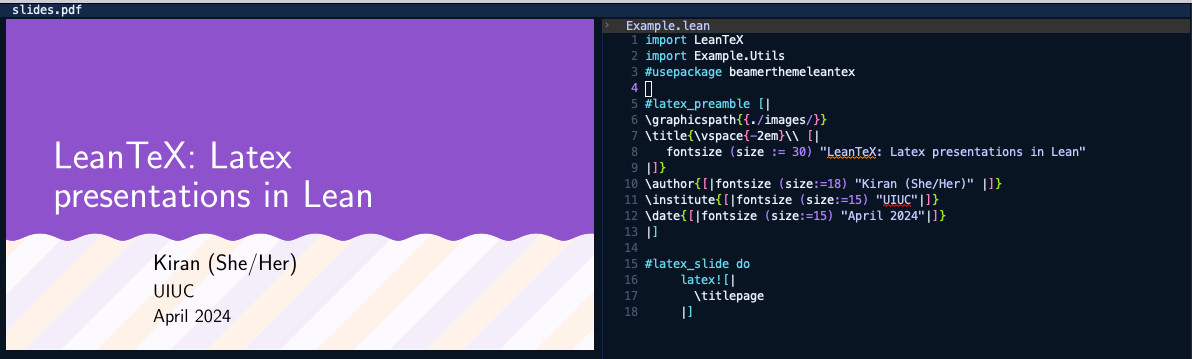
## Usage
LeanTeX is made as easy as possible to use!
Create a new Lean project requiring `LeanTeX` in your `lakefile.toml`:
```toml
# This is your presentation root
[[lean_lib]]
name = "MyPresentation"
# Require LeanTex!
[[require]]
name = "LeanTex"
git = "https://github.com/kiranandcode/leantex.git"
rev = "main"
```
If you are using a `lakefile.lean`:
```lean
-- lakefile.lean
package MyPresentation
-- This is your presentation root
lean_lib MyPresentation where
-- Require LeanTex!
require LeanTeX from git "https://github.com/kiranandcode/leantex.git" @ "main"
```
In your Lean project, you can import `LeanTeX` use its DSL to write LaTex directly from Lean:
```lean
-- MyPresentation.lean
import LeanTeX
#usepackage bera
#usepackage hyper
#latex_slide do
latex![| \titlepage |]
```
Finally, to build the presentation, run `lake exe GenerateSlides`:
```bash
$ lake exe GenerateSlides
...
Output written on slides.pdf (5 pages, 33772 bytes).
Transcript written on slides.log.
```
The resulting presentation PDF will be placed in `build/slides.pdf`
## Features
- *Escape hatch* - `latex![| |]` acts as an escape hatch for inserting
arbitrary text into the generated file.
```lean
latex![| \author{[|fontsize (size:=18) "Kiran (She/Her)" |]} |]
```
The macro itself is an interpolated string, but unlike Lean's
default string interpolation, we use `[| |]` to break out back into
Lean. `@{}` also is allowed to escape back into Lean.
- *DSL for Slides* - LeanTex comes with a built in DSL for simplifying
some LaTeX constructions within Lean:
```
slide "Example Slide" do
\begin{itemize}
\item{"Writing LaTeX-like code within Lean"}
\item{"Looks like LaTeX"}
\item{"is actually Lean~"}
\end{itemize}
```
- *Animations* - the `with steps` macro allows named steps for your
animations, avoiding the issue with hard to grasp numeric animation indices
```lean
with steps [step1, step2, step3, step4] do
latex![|
\begin{tikzpicture}
\draw<@{step1}-> (0,0) rectangle ++(1,1);
\draw<@{step2}-> (1,0) rectangle ++(1,1);
\draw<@{step3}-> (2,0) rectangle ++(1,1);
\draw<@{step4}-> (3,0) rectangle ++(1,1);
\end{tikzpicture}
|]
```
- *Static files* - If you create a directory `static` you can place
files that should be copied into the build directory
See `example` for an example of a LeanTeX project.